

Overview
Claros Health’s data extraction system enables healthcare providers to automatically extract and structure critical information from medical documents. We develop state-of-the-art (SotA) PDF extraction models to collect and analyze patient data for quality reporting.Design Philosophy
Our dashboard features a no-code platform that allows you to define any numerical or date variables for extraction. Any equation of these variables is considered a metric and will be calculated and shown for each patient. In this section, we will assume that relevant variables and metrics are already defined, and cover how you can use our dashboard to extract complex patient values. Please refer to the other sections for a tutorial on how to configure these variables and metrics.Process Workflow
-
Click on a patient profile, and choose the variable that you would like to extract. There are two buttons for each variable: the edit button allows for manual extraction, while the scrape button allows for AI-assisted extraction.
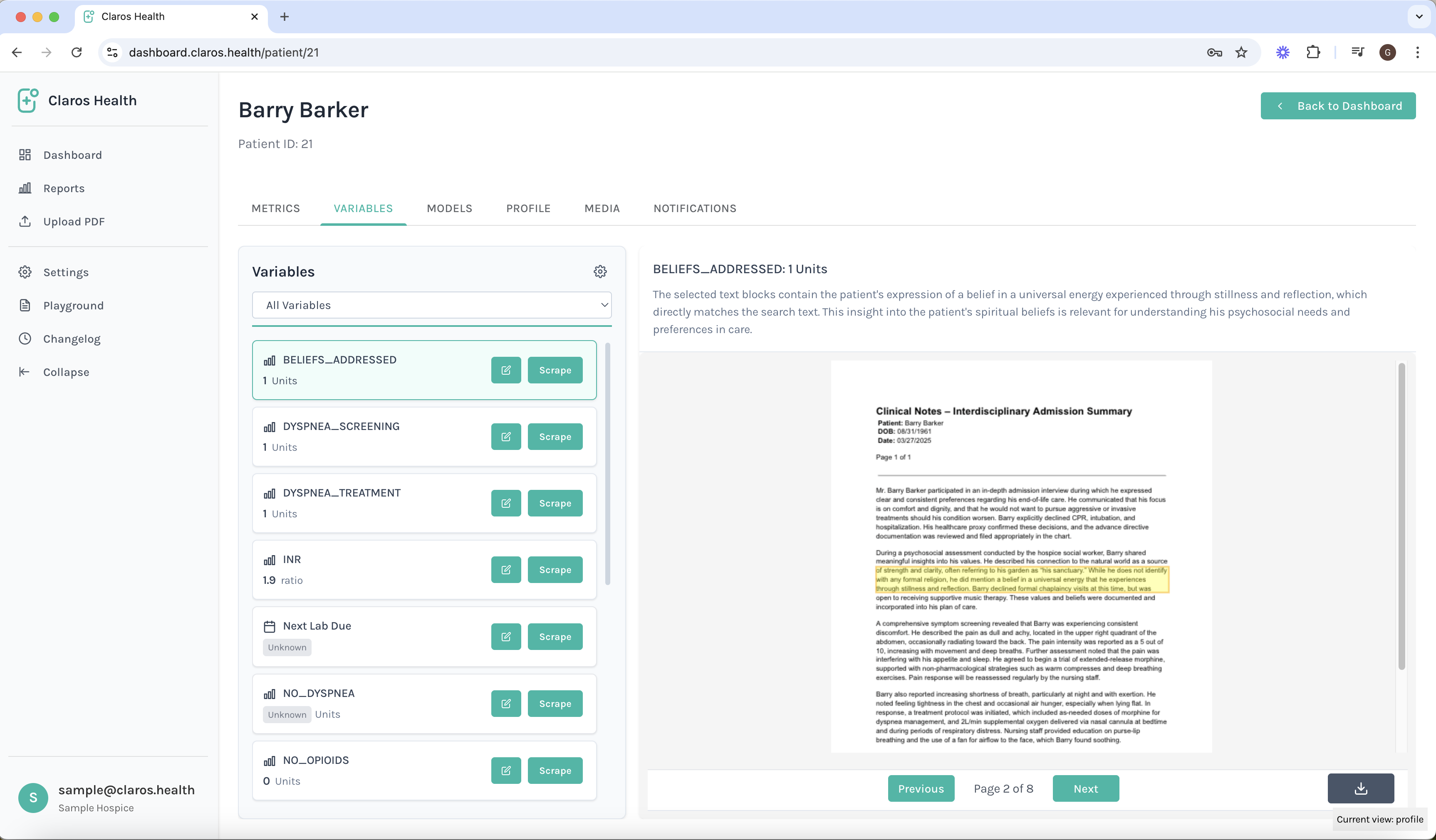
-
For AI-assisted extraction, click on the Scrape button and wait for the result modal to pop-up. You may change the model by clicking on the settings cog on the top right, as shown in the diagram.

-
For manual extraction, click on the edit button. You can customize the value, the note, and draw a relevant bounding box in the PDF.
Note that our in-house model will do all three automatically if you choose to use the AI-assisted extraction tool.
